Kids Engine turns STEAM learning into a visible cycle of making.
A lesson becomes a project. Blocks become a program. A child tests an idea, sees what happens, and explains what changed. Kids Engine brings curriculum, coding and hands-on making into one guided workshop, with teachers there to support the next discovery.
Use Arrow keys, Page Up, Page Down, Home, or End to present section by section. The controls respect reduced-motion preferences.
The idea labA tiny spark of possibility
One small connection. A whole new idea.
Simulated illustration · light sensor on P0/P14
01 / The problem
Keep the idea connected to the thing a child makes.
A finished project does not always show what a child learned. The challenge, the code, the test and the explanation can live in separate tools. Teachers need a way to follow that whole journey while helping a room full of young makers.
For young makers
Give each build a purpose, room to experiment, and a chance to explain what worked.
For teachers
Bring planning, progress, support and review together during a live workshop.
For curriculum teams
Follow a learning objective from the lesson into the activity, the materials and the learner's evidence.
02 / The solution
Human-centered STEAM starts with people.
Human-centered design gives making a purpose: understand someone’s needs, imagine possibilities, build a prototype, and improve it through feedback.
Orient
Act
Test
Explain
03 / The product
A shared workshop. A clear role for everyone.
Children focus on their next step. Teachers guide the group. Curriculum coordinators inspect the learning behind it. Each view connects to the same work, with access matched to the role.
Student
Explore missions, build and test ideas, save progress, and use teacher feedback.
Your workspace
Your own work and approved group projects.
Teacher and facilitator
Plan workshops, choose parts, guide learners, and review their work.
Your workspace
Your assigned workshops and learners.
Curriculum coordinator
Review published lessons, learning objectives, and materials.
Your workspace
Published curriculum, with learner records kept private.
Missions and lessons
Find a challenge, preview the lesson, and assign a specific curriculum version so everyone starts from the same plan.
Code, test, and explore
Create with blocks, connect supported parts to simulator ports, and explore output, board readings, and pins in one workspace.
Missions and Free Build share one Blockly workspace, with a simulator that matches the editor's height and an always-open area for Console, Board Readout, Pins, and Parts. Search and category filters help children find a part; connecting it to a compatible simulator port adds configured starter blocks.
Workshop Parts
Teachers select the workshop's parts once. That saved Parts Set informs lesson fit, child instructions, Build Lab and the supported simulator controls.
Workshop Missions and projects
Turn a challenge into a project, work together, and explain what you made.
Enlarge screenshot:Shared workspace. Missions and Free Build use this editor, simulator, and four-tab tools area. This example runs in the public simulator.Enlarge screenshot:Port view. Icons, names, and cable pictures show saved connections, with one selected part's controls below. This software view does not verify physical wiring.
Group Mode fits shared-laptop workshops
Children share a laptop and build in a team workspace while each child checks in individually.
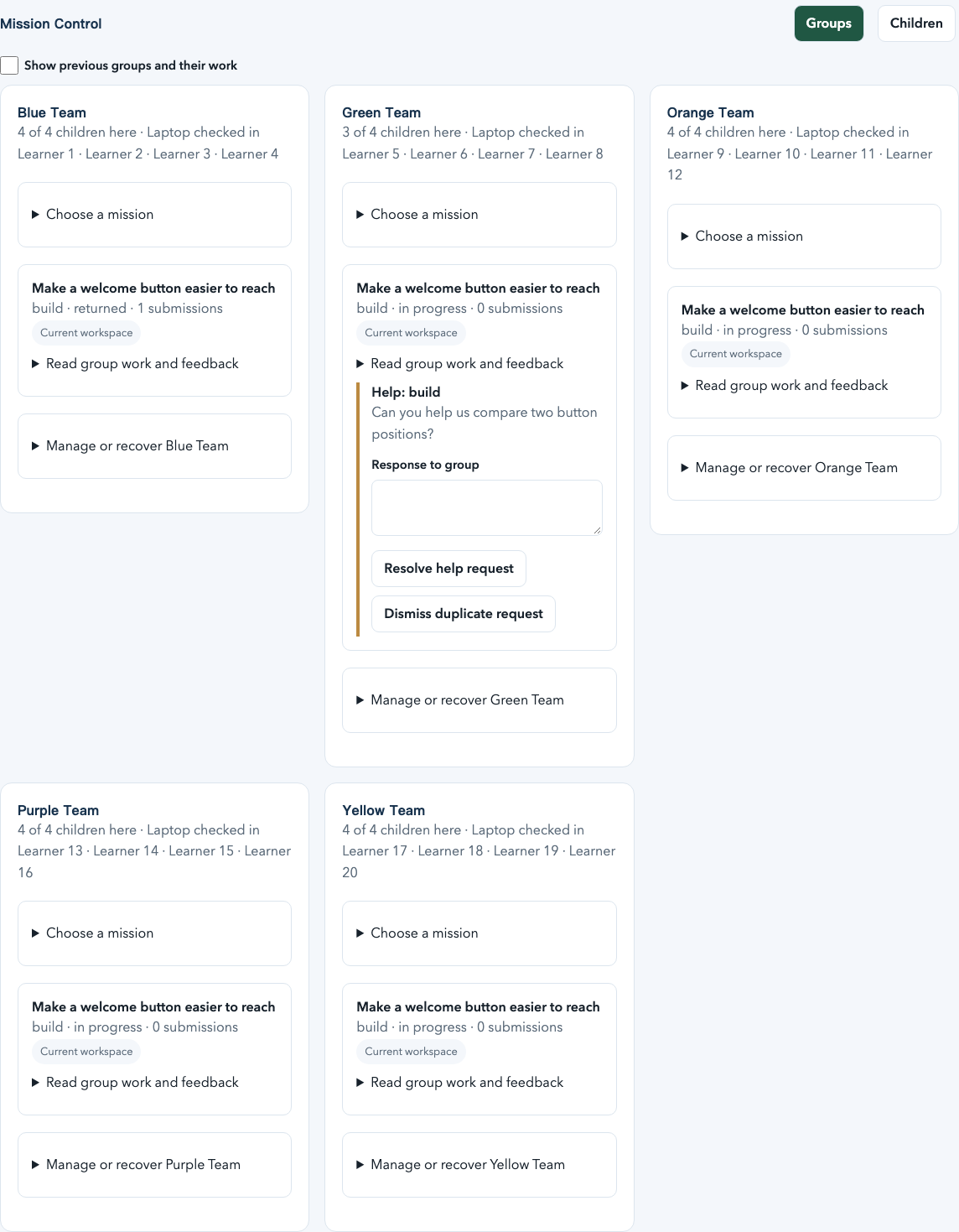
A workshop can organize children into teams with shared equipment, reusable Group Sets and facilitator visibility in Mission Control. Individual attendance and team project history stay distinct across the program.
Four children and one team submission means four participating children and one submission.
Kids Engine supports both structured human-centered missions and open-ended building in the same workshop.
Two useful paths
Build Something lets a child or team start with a blank canvas or a small optional starter, choose supported parts, add or remove compatible parts, code, test, save, and reopen while the workshop sign-in remains valid.
The coding tools stay familiar when a workshop moves between a mission and an open-ended build.
Workshop resilience
Free Build uses its own project and policy path, so a workshop can keep making when a mission is absent or unavailable.
Flexible facilitation
Mission Control can open Free Build for everyone or selected groups without changing curriculum first.
Separate evidence
Free Build projects and participation stay separate from mission submissions, completions, and learning outcomes.
The software path is implemented. The preflight review does not validate the setup; the live Test My Parts check is in Build Lab. Physical hardware and participant validation remain next steps.
Kit Studio
Start with the parts on the workshop table.
No premade kit is required. Teachers combine hardware, tools, materials and custom supplies, save a reusable plan, then prepare a copy for each workshop.
Choose
Add hardware, scissors, paper, recycled boxes and other useful supplies with their quantities.
Match
Check required quantities, optional supplies and alternatives. Add available missing items while planning.
Make
Open the session when supplies are ready. Its saved materials stay with the assigned mission and the learner’s project.
micro:bit is the main hardware platform, with more platforms planned.
More ways into making, through one browser workspace.
Workshops have different devices, languages and levels of support. Kids Engine combines browser coding, supported simulations, modular board adapters and multilingual interfaces around a guided learning experience.
Browser firstOne interface for learning, coding, simulation, and evidence.
Modular devicesBoard adapters make each device's supported actions explicit.
Flexible participationThe workshop's selected parts determine which physical and simulated paths are available.
Multilingual foundationTranslated interfaces and right-to-left layouts support more workshop contexts.
06 / Differentiation
The learning continues beyond getting the code to run.
Visible learning loop
Children can move from the challenge to a test, an explanation, teacher feedback and another attempt.
A lesson you can trace
Each assignment keeps its exact curriculum version alongside the learner's evidence and review history.
Safety as workflow
Server policies enforce who can access a child's work, where it can be shared, and which consent and release checks apply.
Start with people
Listen and observe before deciding what to make.
A teacher in the loop
Teachers can observe progress, respond to support needs and review evidence as the workshop unfolds.
Learn by making
Build, test, explain, and improve.
Physical connections stay visible
Supported parts connect to the printed P0/P14, P1/P15, P2/P16, and I2C interfaces on a micro:bit with Seeed Grove Shield. Blocks and simulated parts use those same socket names.
One reusable coding platform
Missions, Free Build, individual learners, and shared-device teams use the same editor, component model, and simulator runtime. Project ownership stays with the child or team.
07 / Platform and ecosystem
One learner's explanation can inform the next lesson.
Children share what they made and what they noticed. Teachers review that evidence and adapt delivery. Authorized curriculum roles can review content quality, with approved versions feeding future assignments. The opportunity depends on thoughtful review and on keeping each child's work within its privacy and access boundaries.
Version content
Assign context
Build and test
Review evidence
Improve the next cycle
The market is fragmented across strong single-purpose tools. Kids Engine is positioned as the connective layer across guided STEAM curriculum, coding, real-world building, facilitator operations, family controls, and a learner's evidence over time. The full product-by-product comparison, refreshed September 8, 2026 from official product sources, is in the product document.
The comparison includes coding platforms, creative construction, and classroom robotics. BirdBrain Hummingbird, Makeblock mBlock, and VEX GO broaden the landscape.
08 / Opportunity
A connected product. A market opportunity still to validate.
Schools, workshop providers, and curriculum teams are potential customers. Buyer research, classroom pilots, and pricing validation will shape the route to market.
School and workshop delivery
Explore what schools and workshop providers need to adopt, run and support the product.
Curriculum platform
Test demand for connected curriculum and delivery, with clear publishing and review responsibilities.
Governed ecosystem
Explore approved partnerships and remixing as a longer-term hypothesis. A public marketplace has not shipped.
09 / Business model
Business model is an open strategy area.
Institution licensing, curriculum, kits, services and partnerships are options to investigate. Each needs customer evidence, delivery costs, a child-privacy review and a clear operating model. There is no approved pricing model, and the product includes no purchasing, subscription, advertising, checkout, or payment integration.
10 / Product at a glance
A foundation for purposeful making.
Curriculum, coding, hardware, and teacher feedback connect in one learning experience.
371 curriculum recordsConnect science, technology, engineering, arts, and mathematics through purposeful projects.
micro:bitMain hardware platform, with more platforms planned
Learning and feedbackSave attempts, reflect on results, and improve with teacher feedback.
Private by defaultKeep work private and share with approved groups through adult review.
Product capability
The shared coding workspace, supported part controls, and program output are implemented software features.
Synthetic validation
Automated checks and fictional workshop rehearsals test software behavior. They do not measure children's learning or engagement.
Physical hardware validation
Simulator behavior does not qualify physical hardware. Supported setups still need supervised bench checks.
Real participant validation
Real workshops with children and facilitators remain the next validation step. Learning impact and facilitator time savings are not established.
The next milestone is a well-supported real workshop.
The foundation is implemented. The next work is to qualify hardware, test with children and teachers, and establish operational readiness. These are documented next steps, not a dated commercial commitment.
Physical hardware and participant validation remain next steps. Software rehearsals do not establish classroom learning outcomes.
Today
Missions and lessons
Free Build and saved open-ended projects
Shared Blockly workspace, simulator, and tabbed workspace tools
Workshop Parts
Workshop Missions and projects
Learning and feedback
Next
Physical hardware testing
Classroom pilots with children and teachers
Accessibility and usability review
Customer and pricing research
Further ahead
More hardware platforms and sensors
Institution integrations with privacy controls
Approved community participation
12 / Vision
An idea a child can build, test and proudly explain.
Human-centered STEAM connects creative confidence with care for other people. Children learn to notice a need, make something useful, and explain how their ideas can help.
13 / Closing
The next chapter belongs in real workshops.
Kids Engine has a working product foundation to put in front of accountable partners. The next proof is external: learning quality, child and teacher usability, qualified physical setups, operational readiness, buyer demand and a sustainable model. That is the work that can turn a promising learning loop into a dependable workshop.